Inside the workshop

The wonderfully messy bit behind every app.

This is where the polished App Store pages step aside. Come in for the first scribbles, awkward screenshots, ideas that changed their minds, bugs that refused to behave—and the fixes that eventually did.

☕ Honest notes from a self-taught iOS developer
Open notebooks

Every app has a story before it ships.

Choose a notebook to follow an app from its earliest idea through design, development, launch and everything learned afterwards.

Shipped · actively maintained

MochiMoney

The calculator that kept growing into a kinder everyday money toolkit.

Name changeNo-guilt designBug diary
Explore MochiMoney
Preparing for release

Lumarii

A private space for reflection, shaped through quiet iterations.

MoodboardsBuild decisionsWhat changed
Explore Lumarii
In the workshop

Questory

A gaming journal becoming a home for adventures, memories and progress.

Messy notesFeature cutsIn progress
Explore Questory
Dev Journal

Notes from inside the build.

The ideas, wrong turns, tiny breakthroughs and quiet details that shape each app—kept as they happened.

TheCozyDevMonday, 31 August 2026

August's Dev Journal Entry

August felt like the month where TheCozyDev stopped being a collection of ideas and started becoming a real little ecosystem.

At the beginning of all this, I was simply trying to prove to myself that I could finish one app. This month I found myself looking at two released apps, another making its way through TestFlight and App Store preparation, a fourth project becoming far more ambitious than its first sketch, and a growing community following the messy journey behind all of it.

Continue reading

MochiMoney reached the App Store, which still feels slightly surreal to write. What began as a cute calculator grew into a calmer collection of everyday money tools—savings goals, payday planning, subscriptions and small moments of clarity without the judgement that so many finance apps bring with them. Shipping it meant working through builds, tests, subscription details and the less glamorous parts of App Store Connect, but seeing it become something people could actually download made every awkward step worthwhile.

Cozy Pom continued to grow too. I spent time thinking about how to show that it is more than a timer: the journal, the statistics, ambient sounds and the quiet pause after a focus session all matter just as much as the countdown. Turning that story into a proper visual sequence reminded me that explaining an app can be its own kind of design work.

Lumarii took some of the biggest technical steps of the month. CloudKit records were prepared and deployed, tests passed, a build was archived and uploaded, and I worked through how paid features should behave in TestFlight so the whole experience could be tested properly. There were pricing questions, compliance screens and moments where the tooling refused to cooperate, but underneath all of that Lumarii kept becoming what I wanted it to be: a calm, private space for reflection without streaks, pressure or performance.

Questory also moved from atmosphere and ideas into real structure. The library, game details, journal relationships and achievements began to feel connected rather than like separate experiments. It reached TestFlight with a growing set of badges and a clearer idea of what it wants to celebrate—not simply completion percentages, but the stories, screenshots and memories that make games stay with us.

One of the most unexpected parts of August was realising how much the world around the apps matters. I started reshaping TheCozyDev website into somewhere that can properly hold the work: a calm home page, individual spaces for every app, my story, social links and a Workshop where the imperfect development process is allowed to remain visible.

That Workshop has become especially important to me. Polished screenshots and App Store descriptions only show the final surface. They do not show the rejected builds, layouts that looked wrong on a phone, buttons linked to the wrong place, ideas that changed shape or the tiny fixes that finally made everything feel right. I want this journal to keep those parts too.

The community around TheCozyDev grew throughout the month as well. Sharing the work on X and building visual stories for TikTok pushed me to explain why I make these apps, not only what each feature does. More people began finding this little corner of the internet, offering encouragement and sharing what calm, cozy software means to them.

There were plenty of frustrating moments. Simulators got stuck. App Store forms were less clear than they should be. Designs that worked beautifully on a large screen broke the moment they reached mobile. Some tasks took far longer than I expected, and a few apparently small details turned into entire evenings of work.

But August taught me that this is the work. Building an app is not one heroic burst of inspiration. It is returning after the 9–5, making another coffee, fixing the next thing, asking for help when I need it and learning enough to move one step forward.

I am ending the month with more on my desk than I started with, but it no longer feels like a pile of disconnected ideas. Cozy Pom, MochiMoney, Lumarii, Questory and TheCozyDev website are beginning to feel like parts of the same world—useful technology that can still be warm, expressive and kind.

There is still a lot to build, test and learn. But when I look back at everything that moved forward in a single month, I feel proud—not because it was perfect, but because I kept going. One build, one page, one bug fix and one cozy commit at a time. ☕💜

Cozy PomSunday, 5 July 2026

Dev Journal – 4th July 2026

Today ended up being one of those development sessions where lots of small changes came together to make Cozy Pom feel far more polished than it did at the start of the day.

The biggest area of focus was the journal experience. Although the feature was already functional, it didn’t quite have the feeling I wanted. Rather than simply displaying entries, I wanted it to feel like opening a real diary—a calm, personal space that people would actually enjoy revisiting.

Continue reading

The highlight of the update was completely redesigning the journal page view. Each entry is now presented as a realistic notebook page with soft paper colours, subtle shadows and typography that feels much more natural. The latest journal entry also received its own visual treatment, making it stand out as the most recent chapter in the user’s focus journey.

One of my favourite additions was introducing page layering. Instead of every journal page looking identical, older entries now sit slightly behind the newest page, creating the illusion of flipping through a real notebook. It’s a tiny detail that most people probably won’t consciously notice, but together with the paper styling it completely changes how the journal feels.

Navigation through journal entries was also refined, making it much smoother to move between reflections without losing the cosy atmosphere the app is trying to create.

Alongside the visual redesign, I spent time cleaning up the code behind the journal pages. Views were simplified, unnecessary complexity was removed and the overall structure is now much easier to maintain as Cozy Pom continues to grow. Investing time in code quality now will make future features much easier to build.

Looking back, none of these changes are headline features that appear in a marketing trailer, but they’re exactly the sort of improvements that slowly transform an app from something that simply works into something that feels thoughtfully crafted.

It’s another reminder that good software isn’t usually built through giant leaps forward. It’s built through dozens of small decisions that each make the experience just a little bit nicer than it was yesterday.

With the journal now feeling much closer to the vision I had in my head, Cozy Pom is becoming less like a timer app and more like a quiet companion that remembers the journey alongside the user. Those little moments of reflection are starting to feel every bit as important as the focus sessions themselves.

Days like this are my favourite kind of progress—not because huge new features were added, but because the app feels noticeably warmer, calmer and more intentional than it did when I sat down with my morning coffee.

Cozy PomSunday, 5 July 2026

Dev Journal – Building My Little Corner of the Internet

Today marked the beginning of something I’ve been thinking about for a long time—creating a home for TheCozyDev.

Until now, everything I’ve shared has lived across different platforms. TikTok has become the place where I document my journey, the App Store is where people discover Cozy Pom, and GitHub holds my projects. But none of those places truly feel like mine. I wanted somewhere that brings everything together into one cosy little corner of the internet.

Continue reading

One of the biggest decisions today was choosing not to follow the modern trend of sleek, corporate-looking portfolio sites. There are already so many websites that feel cold, minimal and almost identical. That’s not what TheCozyDev is about.

Instead, I want the website to feel exactly like Cozy Pom does—warm, welcoming and somewhere people actually want to spend time. Somewhere visitors can grab a metaphorical cup of coffee, read about what I’m building, browse my projects, catch up on development logs and maybe even get inspired to create something themselves.

I purchased TheCozyDev.co.uk and began learning Framer from scratch. Like most new tools, it felt a little overwhelming at first. I quickly realised that building a website isn’t just about placing text and images on a page; it’s about creating an experience that reflects who you are.

Rather than letting AI generate a generic portfolio, I started planning every section with intention. The homepage will introduce visitors to my world, Cozy Pom will have pride of place as the current flagship project, future apps will have their own showcase area, and there’ll be a dedicated development journal where I can document the journey honestly—the wins, the setbacks and everything in between.

As development continued, I started recreating custom artwork to match the cosy aesthetic I have in mind. Small details like soft rounded corners, warm colour palettes, hand-picked icons and carefully chosen typography all contribute to making the website feel like an extension of the apps I’m building rather than just somewhere that lists them.

The more I worked on it, the more I realised this website isn’t really about promoting apps.

It’s about building a place where people can follow the journey.

I hope that months or even years from now, someone might stumble across these journal entries and see that none of this appeared overnight. Every page, every project and every tiny improvement started with someone who simply decided to learn one thing at a time.

Today wasn’t about launching a website.

It was about building a home for everything that’s still to come.

And that feels like the start of something really exciting.

Cozy PomSunday, 5 July 2026

Dev Journal – Chasing the Perfect Cozy Atmosphere

Today was all about something that most people probably won’t even think about for more than a few seconds when they open the app…

The backgrounds.

Continue reading

On paper it sounds like such a small part of Cozy Pom, but in reality they’ve become one of the biggest creative challenges I’ve faced throughout development.

I don’t just want the app to look nice. I want it to feel cosy.

That feeling is surprisingly difficult to create.

Throughout the day I experimented with colour palettes, lighting, contrast and composition, trying to find the balance between being beautiful and remaining practical. Every background has to support the interface rather than compete with it. Buttons need to stay readable, timer cards have to stand out and the overall atmosphere has to remain calm enough that it doesn’t become distracting during a focus session.

There were plenty of versions that looked fantastic on their own but completely fell apart once the UI was layered on top. Others made the interface crystal clear but lost the warmth I was aiming for. It became a constant cycle of creating, testing, adjusting and trying again.

Slowly though, things started to click.

Each new design taught me something about what Cozy Pom should feel like. Softer lighting made the app feel more relaxing. Better contrast improved readability without sacrificing the atmosphere. Small changes to colours completely changed the mood of the entire screen.

By the end of the session I had several new backgrounds that finally felt like they belonged inside Cozy Pom. They each have their own personality while still feeling like part of the same world.

Looking back, it’s funny how much time can disappear into something that most users will probably never realise took weeks of experimentation.

But that’s part of building something you’re proud of.

The little details matter.

The goal has never been to create the most technically impressive focus timer. It’s to build somewhere people genuinely enjoy spending time—a place that makes focusing feel a little calmer and a little more inviting every time they open the app.

Today’s progress reminded me that good design isn’t usually about one huge breakthrough. It’s dozens of tiny improvements layered on top of each other until one day everything finally feels… right.

And for the first time in a while, I think Cozy Pom is starting to feel exactly like the place I imagined when I first sketched the idea.

Cozy PomSunday, 5 July 2026

🌸 Cozy Pom Dev Journal – 5th July 2026

Today was all about making the Cozy Journal feel even more personal and alive.

One of the biggest additions was introducing a little bit of daily personality to the Journal header. Instead of the space feeling static every time the app opens, it can now display one of the decorative PNG illustrations at random each day. It’s a subtle change, but it helps make the Journal feel like a cozy desk that’s been decorated differently each morning, giving users a small surprise without being distracting.

Continue reading

Alongside that, I continued refining the overall Journal experience, making sure the new decorations fit naturally within the existing layout and maintained the calm, uncluttered feeling that Cozy Pom is built around. A lot of time went into tweaking spacing, positioning and presentation so the artwork complements the interface rather than competing with it.

As with most development days, there were a few unexpected bumps along the way—including a SwiftUI layout issue that briefly stopped progress—but after working through it everything was back on track.

Days like today are a reminder that building a polished app isn’t always about huge new features. Sometimes it’s the tiny details that make an app feel welcoming. Those small touches are often the ones users remember, even if they never consciously realise why the experience feels so comfortable.

Cozy Pom keeps getting closer to becoming the peaceful little focus companion I imagined when I first sketched the idea, one small improvement at a time. ☕✨

Cozy PomFriday, 3 July 2026

Cozy Pom Development Update — From Launch Day to Building the Future

There are some weeks that feel like months.

Since the 22nd June, Cozy Pom has gone from being an app that I hoped people would eventually get to use… to something that’s now live on the App Store and already helping people focus.

Continue reading

It’s been exciting, stressful, frustrating at times, but above all incredibly rewarding.

I thought it would be nice to look back over everything that’s happened.

📱 Finally Launching on the App Store

The biggest milestone was, without question, getting Cozy Pom approved by Apple.

Like every first-time developer, I quickly discovered that submitting an app isn’t the finish line—it’s another part of the journey. There were a few issues raised during review, including missing content rights information, additional iPad screenshots and a background audio issue that had to be fixed before approval.

Each rejection felt disappointing in the moment, but every one of them taught me something about the App Store process.

Eventually the email I’d been waiting for arrived.

Cozy Pom was approved.

Seeing my own app available to download on the App Store was one of those moments I’ll probably never forget.

⭐ The First Review

Not long after launch came another moment I wasn’t expecting so quickly.

My very first App Store review.

Five stars.

It’s difficult to describe how much that meant. When you’ve spent months building something after work, every evening and every weekend, seeing someone take the time to leave kind feedback makes all of those late nights feel worthwhile.

That review now sits as a reminder of why I started building Cozy Pom in the first place.

🎨 Making Cozy Pom Feel Even Cozier

One area I’ve spent far more time on than I ever imagined is the backgrounds.

The goal has never been to simply make the app look nice.

I wanted it to feel like somewhere you’d actually enjoy spending time.

Over the last couple of weeks I’ve designed and tested multiple new environments, experimenting with colour, contrast and readability to make sure the interface stays clear while still creating that warm, relaxing atmosphere.

After lots of iteration, Cozy Pom now includes six different background themes, giving everyone the chance to personalise their own cozy workspace.

Sometimes the smallest visual details end up making the biggest difference.

⚙️ Polishing the Experience

A surprising amount of development isn’t about adding shiny new features.

It’s about making everything feel smoother.

Over the last few updates I’ve spent time fixing background asset issues, improving settings, refining the UI, testing different layouts, making sure backgrounds load correctly and preparing new builds for TestFlight.

Most of this work is invisible.

But it’s exactly this kind of polishing that slowly transforms an app from “it works” into something that feels enjoyable to use every day.

☕ Building After the 9–5

One thing I’ve shared a lot recently is that TheCozyDev isn’t my full-time job.

Every weekday I spend my day helping build somebody else’s business.

Then I come home, make another coffee, open Xcode and continue building my own.

It’s exhausting sometimes.

But it’s also incredibly fulfilling.

Every feature, every design tweak and every bug fix is another small step towards a dream I’ve had for a long time.

🌍 Growing a Community

Launching the app was only the beginning.

Since release I’ve been sharing the journey across TikTok, Reddit and Bluesky, showing not only the finished product but also everything that goes into creating it.

The experiments.

The redesigns.

The mistakes.

The coffee.

The late nights.

The response has honestly been amazing.

People have shared feedback, offered encouragement and reminded me why I wanted to build in public in the first place.

🐶 Looking Ahead — Cozy Companion

While I’m still refining Cozy Pom, I’m already excited about what’s coming next.

One of the biggest planned additions is something I’ve wanted to build for a while: the Cozy Companion system.

Inspired by my own dog, Biscuit, the idea is to introduce an animated little companion who lives inside Cozy Pom.

Rather than simply sitting on the screen, Biscuit will react to your focus sessions, celebrate your achievements, encourage you during breaks and have their own cozy space that you can visit and customise.

The plan is for this to become part of the free 1.5 update, with optional cosmetic outfits and furniture for anyone who wants to personalise Biscuit’s little home.

I think it has the potential to give Cozy Pom even more personality.

🌱 Small Improvements Add Up

If there’s one thing these last couple of weeks have taught me, it’s that software is never really “finished.”

It’s built one tiny improvement at a time.

One bug fix.

One background.

One feature.

One piece of feedback.

Looking back, it’s amazing how much has changed in such a short space of time.

Looking forward…

I feel like Cozy Pom is only just getting started.

And honestly?

I can’t wait to see where this little project goes next.

Thank you to everyone who’s downloaded the app, left a review, commented on a video or simply followed along with the journey.

You’re helping make this tiny cozy corner of the internet something really special.

See you in the next update.

— Em ☕💜

Cozy PomSunday, 21 June 2026

Cozy Pom Dev Journal Entry

Today wasn’t one of those days where I added a massive new feature or wrote loads of code, but it was still a really important day for Cozy Pom.

Most of today was spent getting everything ready for the App Store.

Continue reading

I’ve quickly learned that building the app is only half the battle. Once the coding starts slowing down, there’s a whole other side to app development that nobody really talks about. App descriptions, keywords, age ratings, privacy policies, support pages, review information… the list just keeps growing.

I worked through all of that today.

The app description took a few attempts to get right, and after finally being happy with it, Apple decided it didn’t like the emojis I’d used. Turns out App Store Connect is a lot less fun than I am. Once those were removed, everything saved correctly and I was back on track.

One of the biggest wins today was getting the support page sorted.

At first I wasn’t entirely sure what I was doing with GitHub Pages, repositories, and how everything linked together. There was definitely a moment where I considered deleting the whole thing and starting again. Thankfully I stuck with it and eventually got everything working properly.

Seeing the support page and privacy policy live online felt surprisingly good. They’re not exciting features that users will ever talk about, but they’re another sign that Cozy Pom is becoming a real app rather than just a project sitting on my MacBook.

I also worked through age ratings, app availability, copyright information, and all the other bits Apple wants before they’ll even consider letting an app onto the store.

The more I work through App Store Connect, the more respect I have for indie developers. There’s so much more involved than simply building something that works.

Outside of the App Store preparation, I started thinking about how I want to share the journey publicly.

I created a TikTok account for TheCozyDev and started planning what the first post should be.

The more I thought about it, the more I realised I don’t really want it to be about marketing.

I’d rather show the journey.

The late nights.

The bugs.

The moments where everything breaks.

The moments where everything suddenly works.

The reality of learning app development while working a full-time job.

That’s what TheCozyDev has always been about for me.

Not pretending to be a huge studio.

Just one person building cozy things, learning as they go, and sharing the process.

Looking back, it’s actually quite mad how much has happened in such a short space of time.

A few months ago I had an idea.

Today I have:

• A working app

• TestFlight builds

• Dynamic Island support

• A live privacy policy

• A support website

• App Store assets being prepared

• A genuine launch on the horizon

There is still plenty left to do, but for the first time it feels like the finish line for Version 1.0 is actually in sight.

Cozy Pom started as a random idea.

Now it’s becoming something real.

And honestly, that’s a pretty cool feeling.

— Em ☕

Cozy PomFriday, 19 June 2026

Cozy Pom Dev Journal #08 - TestFlight, Tough Decisions & Getting Close To The Finish Line

There are moments when working on Cozy Pom feels like I’m learning how to code.

And then there are moments where I sit back, look at everything that’s been built, and think:

Continue reading

“Hang on… this is actually becoming a proper app.”

This session felt a lot like the second one.

🚀 Another Build Uploaded To TestFlight

The biggest milestone was getting another build uploaded and back onto my phone for testing.

After all the UI tweaks, bug fixes and improvements we’ve been making recently, it felt like the right time to stop adding things for a moment and just use the app properly again.

The upload went through without any issues, processed in App Store Connect and was ready for TestFlight.

Seeing Cozy Pom sat on my phone like a real app still hasn’t quite got old yet.

It’s easy to forget how far this project has come when you’re buried in Swift files and trying to work out why one button has suddenly decided to stop working.

✨ Lots Of Small Polish

This wasn’t one of those sessions where a huge new feature appeared overnight.

Instead, it was all about polishing what already exists.

Honestly, some of the best improvements are the ones nobody notices.

Better spacing.

Cleaner layouts.

More consistent screens.

Making things feel calmer and less cluttered.

The whole goal with Cozy Pom has always been to create something that feels relaxing to use, not something that overwhelms you with information.

Every little adjustment gets us closer to that.

☕ The Session Flow Finally Feels Right

One thing I’ve been really happy with recently is how the timer flow now works.

Instead of simply ending a focus session and dumping you somewhere else, the app now feels much more intentional.

You finish a focus session.

Reflect on how it went.

Choose a short or long break.

Take that break.

Then jump back into focus mode.

It’s simple, but it feels natural.

And for a Pomodoro app, that’s kind of the whole point.

📱 Real World Testing Time

With the latest build installed, the plan now is simple:

Use it.

A lot.

Not as a developer.

As a user.

It’s amazing how many little things you notice when you’re using your own app naturally rather than constantly looking at code.

Sometimes it’s not bugs you find.

Sometimes it’s things that just don’t feel quite right.

Those are usually the things worth fixing before launch.

🤔 Making A Tough Decision

One of the biggest conversations we had wasn’t actually about adding something.

It was about removing something from the roadmap.

Widgets.

They’ve been sitting on the list for a while and, on paper, they sound great.

But when I really thought about it, I realised something.

I barely use widgets myself.

When I’m running a timer I’m usually looking at the Dynamic Island, my Lock Screen or simply opening the app.

A widget doesn’t really add much value for me personally.

So rather than spending weeks building something because I feel like I should, I’d rather spend that time building something that genuinely improves the experience.

🏝️ Dynamic Island Is Officially Next

That decision made the next step pretty obvious.

Dynamic Island and Live Activities have now moved right to the top of the Version 1.1 roadmap.

The more I think about it, the more it feels like the perfect fit for Cozy Pom.

Being able to see:

Time remaining

Session progress

Current focus mode

Quick updates without opening the app

would make Cozy Pom feel much more like a native Apple experience.

And honestly, it’s one of the features I’m most excited to build.

📊 Looking Back

Something else we talked about was just how much work has gone into this project already.

When Cozy Pom started it was little more than an idea.

Now it has:

Focus sessions

Short and long breaks

Reflections

Journaling

Statistics

Weekly charts

Notifications

Haptics

Ambient sounds

Beautiful UI

TestFlight builds

And that’s kind of crazy when I stop and think about it.

As someone who’s never launched an app before, there have definitely been moments where I’ve questioned whether I could actually do this.

But every problem solved and every feature completed has slowly chipped away at that doubt.

🎯 What’s Next?

For now, the plan is simple.

Keep testing.

Keep using the app.

Keep looking for anything that feels off.

If everything goes well, we’ll move into Version 1.1 and start working on:

Dynamic Island

Live Activities

More ambient sounds

Additional polish

And then after that…

The App Store.

Typing that still feels slightly unreal.

Final Thoughts

A few months ago Cozy Pom was just another idea.

One of many.

The difference this time is that I stuck with it.

Instead of jumping to the next shiny idea, I kept showing up, solving one problem at a time and slowly building something real.

There’s still work to do.

There will always be work to do.

But for the first time, I can genuinely see the finish line.

And that’s a pretty cool feeling. ☕✨

Current Status: TestFlight Testing 🧪

Next Major Feature: Dynamic Island & Live Activities 🏝️

Current Mood: Excited, slightly nervous, but ready for what’s next 🚀☕🌙

Built with coffee, determination, far too many late nights, and a stubborn refusal to give up when Swift decided to be difficult. 😅

Cozy PomMonday, 15 June 2026

Cozy Pom – The Day It Finally Reached TestFlight

June 14th, 2026

There are days when progress feels obvious.

Continue reading

Then there are days when it feels like nothing is working, every fix creates two new problems, and you’re convinced you’ve somehow broken everything.

Yesterday was a little bit of both.

When I first started building Cozy Pom, it wasn’t really about creating the next productivity app. The App Store already has thousands of those. What I wanted was something that felt different. Something calmer. Something that felt like sitting down with a warm coffee, opening a notebook, and focusing on one thing at a time.

A productivity app that didn’t shout.

A productivity app that felt cozy.

Yesterday was the day that vision finally made it onto my phone.

The Final Push

The last stretch of development felt like a whirlwind of problem solving.

There were design tweaks, interface improvements, timer adjustments, settings changes, notification fixes, and countless little details that most users will never notice but somehow matter immensely when you’re the one building it.

Every time one issue was fixed, another seemed to appear.

Buttons would disappear.

Layouts would shift.

Settings wouldn’t behave.

Apple would complain about something new.

Xcode seemed determined to test my patience at every possible opportunity.

And then came the provisioning profiles.

The certificates.

The bundle identifiers.

The device pairing issues.

The endless cycle of:

“Why isn’t this working?”

followed by

“Wait… I think I’ve fixed it.”

followed by

“Nope.”

followed by

“Wait… now it’s fixed.”

The Apple Developer Maze

If there’s one thing I’ve learned, it’s that building the app is only half the challenge.

Getting Apple to accept that you’ve built the app is a completely different game.

There were moments where everything appeared to be configured correctly and yet nothing wanted to communicate with anything else.

Xcode wasn’t happy.

The developer portal wasn’t happy.

My phone wasn’t happy.

And I certainly wasn’t happy.

But little by little, each problem got solved.

A profile here.

A setting there.

A missing permission.

A forgotten checkbox.

One by one, the roadblocks disappeared.

Uploading Build 1.0

Eventually the moment arrived.

The build was ready.

The button appeared.

Distribute App.

A simple button.

Yet probably the most terrifying button I’ve pressed during this entire project.

After all the planning, designing, coding, testing, redesigning, fixing and learning, it was time to send Cozy Pom out into the world.

I clicked it.

The upload started.

And then the waiting began.

When the confirmation appeared saying:

“Cozy Pom 1.0 uploaded.”

it felt unreal.

For the first time, Cozy Pom existed somewhere beyond my Mac.

The Moment Everything Changed

Not long after, I installed the build.

Not in the simulator.

Not inside Xcode.

Not as a preview.

On my actual phone.

The same way any future user would.

And honestly?

That moment hit harder than I expected.

Seeing the icon on my home screen.

Tapping it.

Watching it launch.

Knowing that it had gone from a random idea to a genuine iOS application.

That’s a feeling that’s difficult to describe.

Because it isn’t really about the app.

It’s about proving to yourself that you can build something.

What I Learned

This project taught me something important.

You don’t need to know everything before you start.

If I’d waited until I felt “ready” to build an app, Cozy Pom would still be sitting in a notebook somewhere.

Instead, I learned by doing.

I learned by breaking things.

I learned by fixing things.

I learned by asking questions.

I learned by refusing to quit when the solution wasn’t obvious.

Every problem solved became knowledge I didn’t have the day before.

And that’s how projects grow.

That’s how developers grow.

Looking Ahead

Getting Cozy Pom into TestFlight isn’t the finish line.

It’s the beginning.

There are features still planned.

Ideas still waiting.

Improvements still to come.

Version 1.1 is already taking shape in my head.

But yesterday was important because it marked the end of one chapter.

The chapter where Cozy Pom was just an idea.

Now it’s real.

Now it’s on a phone.

Now it’s in TestFlight.

And for the first time, I can genuinely say:

I built an app.

Not perfectly.

Not without frustration.

Not without mistakes.

But I built it.

And that’s something worth celebrating.

☕✨

— Em

Founder, TheCozyDev

Cozy PomThursday, 11 June 2026

Opening The Cozy Jukebox

Today wasn’t about apps.

It wasn’t about code, bug fixes, feature requests, UI design, App Store submissions, or trying to solve a problem.

Continue reading

Today was about building a soundtrack.

Over the years I’ve realised that music has become deeply connected to everything I create. Different projects have different moods. Different moments require different energy. Some days call for focus, others for reflection. Sometimes you need motivation, and sometimes you simply need to disappear into a world for a few hours.

What started as a conversation about a single playlist quickly became something much bigger.

A collection.

A universe.

A soundtrack for different chapters of life.

One by one, the playlists began to take shape.

Daylight Autopilot became the soundtrack for productive mornings and steady momentum. The kind of music that quietly helps you get things done without demanding your attention.

Greenhouse Mode grew into something softer. A playlist about progress rather than productivity. About nurturing ideas, habits, projects, and dreams one small step at a time.

Rainy Window Sessions arrived wrapped in soft blankets, warm coffee, and the sound of rainfall against the glass. A place to slow down and simply exist for a while.

Midnight Commit became the playlist for creators. Those late-night coding sessions where one idea turns into another and suddenly it’s far later than it should be.

After Hours explored something different. The quiet magic that happens when inspiration arrives after the day is supposedly over.

Night Drive captured empty roads, glowing city lights, distant horizons, and the peaceful clarity that can only be found behind the wheel after dark.

Then things became louder.

Dust & Thunder rolled in carrying country roads, worn denim, open skies, and stories that sound better with a guitar in the background.

Static & Sparks embraced youthful rebellion, nostalgia, and the kind of songs that deserve to be played far too loudly.

Steel & Fire turned the volume up even further with arena-sized riffs and enough energy to make any ordinary day feel a little bigger.

And finally, Iron & Ash arrived carrying thunder, fire, steel, and the reminder that sometimes strength can be found inside a guitar riff.

Somewhere in the middle of all of this, another playlist appeared almost accidentally.

Friday Night Respawn.

The soundtrack to weekends.

To gaming sessions.

To Discord calls.

To “one more game” that somehow turns into three in the morning.

To freedom.

Looking at the collection now, what surprises me most is that these playlists aren’t really about music.

They’re about moments.

Each one represents a feeling.

A place.

A mood.

A chapter.

Together they form something larger than a playlist collection.

They’re the soundtrack to the CozyDev universe.

A universe built around creativity, comfort, growth, adventure, nostalgia, friendship, focus, and the small moments that make life feel meaningful.

Maybe one day they’ll become part of an app.

Maybe they’ll simply remain playlists.

Either way, it feels like something special has been created.

A jukebox filled with different worlds.

And every one of them feels like home.

🎧✨

MochiMoneyMonday, 8 June 2026

I’m feeling lost and a bit out of my depth.

I have a million ideas for what I want to create. I love the creative and coding aspects of app development but lately I feel like I lack the knowledge to bring any of these ideas to life or launch a truly good app on the App Store. I’m struggling to focus on a single idea and commit to it until it’s finished. I’m going to ask ChatGPT to help me stay on track until at least Mochi Calc is complete.

I asked ChatGPT to analyse my past conversations and projects and it doesn’t think I lack the knowledge to launch an app. In fact, it said I have a lot of expertise on the subject and I’m learning as I go which is normal and common in app development. This makes me feel a bit better about the situation. Chat also suggested I stop brainstorming for 30 days. Just open a new note and jot down ideas as they come but then leave them for later. This way Mochi Calc gets all the attention. Chat also reckons I’ll be ready to launch the app this summer as they say it’s currently 80-90% ready! I’ll try Chat’s idea and see how far we get. I won’t work on it every day just when I’m feeling in the coding mood.

MochiMoneyMonday, 8 June 2026

Opening The Cozy Vault

For a long time, I thought my problem was a lack of knowledge.

Every time I sat down to work on one of my apps, I’d eventually hit a wall. A feature I wasn’t sure how to build. A design decision I couldn’t make. A technical problem that seemed bigger than my current skill level.

Continue reading

So I’d do what felt productive.

I’d start something new.

A fresh idea always felt exciting. A new app meant a clean slate. No bugs. No unfinished features. No difficult decisions waiting to be made. Just endless possibility.

And so, without really meaning to, I started collecting projects.

Cozy Pom.

MochiCalc.

ScentSpin.

Cozy Saga.

Cozy Skies.

NightDrive.

And dozens of smaller ideas living in notes, sketches, screenshots, and concept art.

Each one represented a version of the future that I wanted to build.

The problem wasn’t that any of them were bad ideas.

The problem was that I was trying to build all of them at once.

At some point, I realised something uncomfortable.

I wasn’t abandoning projects because they weren’t good enough.

I was abandoning them because they stopped being easy.

Every project follows the same journey.

The idea arrives.

The excitement kicks in.

The concepts start flowing.

The branding appears.

The UI takes shape.

And then eventually, the work begins.

The less glamorous parts.

Fixing bugs.

Learning things you don’t know.

Refactoring code.

Making decisions.

Finishing.

That’s usually where the next shiny idea appears.

And for someone who loves creating things, that’s a dangerous moment.

Because the new idea always feels more exciting than the current project.

So today I’m opening The Cozy Vault.

The Cozy Vault is where every new idea goes.

Not because the ideas aren’t good.

Not because they aren’t worth building.

But because they deserve their turn.

Instead of immediately starting a new project, I’ll write it down and place it safely inside the vault.

The idea isn’t lost.

It isn’t forgotten.

It simply waits.

This gives me permission to stay focused on the project already in front of me.

To finish what I’ve started.

To learn what I need to learn.

To ship something real.

For now, the mission is simple.

One project.

One finish line.

One release.

Not perfect.

Not feature complete.

Not the ultimate version that’s lived in my head for months.

Just finished.

Because I’ve started to realise that confidence doesn’t come from having more ideas.

It comes from completing them.

The first app I release won’t be the best thing I’ve ever build.

But it will be the most important.

Because it proves something to myself.

That I can finish.

That I can launch.

That I can turn an idea into something real.

And once I’ve done that, The Cozy Vault will still be there.

Filled with adventures waiting for their turn.

But for now, the vault is open.

The ideas are safe.

And it’s time to build.

MochiMoneyThursday, 28 May 2026

MochiCalc — Building Something Cute From Something Ordinary

MochiCalc started from one very simple thought:

Why are calculators so boring?

Continue reading

Seriously.

We use them almost every day. Phones, desktops, tablets — calculators are everywhere. But somehow they’ve barely changed. Most of them feel cold, overly functional, and completely forgettable.

And I kept thinking…

What if even the smallest apps could feel comforting?

That idea became MochiCalc.

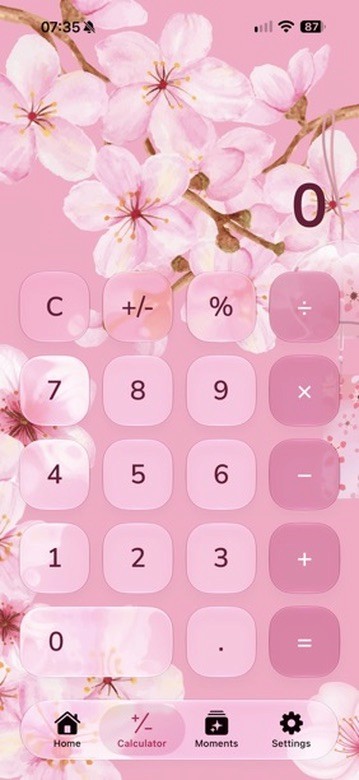
At first it honestly started as a fun little side project. I wanted to create something playful and cozy — something inspired by kawaii aesthetics, soft colours, warm lighting, rounded buttons, and that satisfying “cute but premium” feeling that so many apps miss.

I didn’t want it to feel childish.

I wanted it to feel designed.

Carefully designed.

The kind of app where somebody opens it for the first time and immediately smiles without really knowing why.

The early versions were rough.

A lot rougher than the final vision in my head.

I spent hours adjusting tiny details most people would probably never notice:

button placement,

soft shadows,

screen alignment,

colour palettes,

how the buttons animate,

how the UI sits on top of the artwork,

even the exact feeling of tapping a number.

And surprisingly… that became one of my favourite parts of the project.

MochiCalc taught me that creating cozy software is less about giant flashy features and more about attention to detail.

The atmosphere matters.

The mood matters.

The way something feels matters.

One thing I’m really proud of is that MochiCalc slowly evolved from “cute calculator” into something that genuinely fits within TheCozyDev universe.

The pastel Sakura Garden aesthetic.

The soft pinks and purples.

The cozy UI.

The polished Apple-inspired layouts.

The idea that utility apps don’t have to feel sterile.

It became proof of concept for something bigger.

That people actually want software with personality.

And honestly, the development process has been chaotic at times.

There were moments where buttons were misaligned, screens broke completely, assets refused to scale correctly, and Xcode tested my patience more than I’d like to admit.

But weirdly… those moments are now part of the project too.

Because MochiCalc wasn’t made by a huge studio with unlimited resources.

It was built through trial and error, late nights, experimenting, learning as I go, fixing mistakes, rebuilding things repeatedly, and slowly getting closer to the vision in my head.

And that’s what makes the project feel real to me.

Right now, MochiCalc still feels like the beginning rather than the finished product.

There are still new themes I want to create.

New animations.

More personality.

Tiny details that could make it even more satisfying to use.

But seeing the app slowly transform from an idea into something tangible has honestly been one of the most motivating parts of building TheCozyDev.

Because it proved something important to me:

Even the most ordinary apps can feel magical if enough care goes into them.

TheCozyDevThursday, 28 May 2026

TheCozyDev - How it all started

TheCozyDev didn’t begin as a business plan.

It began at night.

Continue reading

Usually far too late, with YouTube videos playing quietly in the background, rain sounds on a speaker somewhere, and ideas that refused to leave my head.

I’ve always loved technology, games, cozy spaces, soft lighting, late-night drives, coffee shops, relaxing music, and worlds that make you feel something. But one thing I kept noticing was how cold most apps and digital experiences had become.

Everything felt optimized.

Fast. Loud. Addictive. Clinical.

Very little felt comforting.

I started wondering what would happen if software felt more human. More emotional. More atmospheric. What if opening an app felt the same way as putting on your favourite hoodie after a long day? What if productivity apps didn’t make people feel guilty? What if digital spaces could feel warm?

That idea stayed in my head for a long time.

At first, I had absolutely no idea what I was doing. I wasn’t some professional studio with years of experience. I was just somebody with ideas, curiosity, and a laptop, slowly teaching myself design, development, branding, UI, animation, and everything in between.

Most of TheCozyDev was built through experimentation.

One tiny idea would turn into another:

a cozy timer app,

a kawaii calculator,

a dreamy weather concept,

a digital journal,

soft neon night-drive aesthetics,

sleepy pets,

ambient rain,

warm lighting,

little comforting details that make software feel alive.

Some ideas failed instantly.

Others slowly evolved into something bigger than I imagined.

But that’s the thing about creativity — sometimes you don’t fully know what you’re building at first. You just follow the feeling.

And the feeling was always the same:

Create digital spaces people actually want to exist inside.

Not just tools.

Not just apps.

Places.

TheCozyDev became my way of blending everything I love into one universe:

cozy aesthetics,

gaming culture,

late-night atmosphere,

cute design,

music,

comfort,

technology,

and emotion.

I wanted to create experiences that feel calm in a world that constantly asks people to move faster.

And honestly?

This is still only the beginning.

There are still hundreds of ideas scribbled in notes apps at 2am. Half-finished concepts. New worlds I want to build. Bigger dreams I haven’t figured out yet.

But I think that’s part of the charm.

TheCozyDev was never supposed to be perfect.

It was supposed to feel real.

And somehow, from all those late nights, ideas, coffee-fuelled design sessions, and “what if…” moments…

TheCozyDev was born.

QuestoryThursday, 28 May 2026

Ultimate Cozy Gaming Journal — Why I Wanted To Build It

Gaming has always been more than just “playing games” to me.

Some people see games as entertainment.

Continue reading

But for a lot of us, games become memories.

Specific loading screens remind us of certain years of our lives. Certain soundtracks instantly transport us somewhere emotionally. Some games become comfort spaces we return to after difficult days. Others become entire eras we never really forget.

And yet…

Most gaming apps feel incredibly lifeless.

They track statistics.

Hours played.

Achievement percentages.

Completion rates.

But they completely miss the atmosphere and emotion behind gaming itself.

That’s where the idea for Ultimate Cozy Gaming Journal came from.

I wanted a space that felt less like a database and more like a personal gaming sanctuary.

Something warm.

Something aesthetic.

Something that understood why people take screenshots of sunsets in games. Why we sit in pause menus listening to soundtracks. Why rainy in-game cities somehow feel comforting at 2am.

The app started with one core idea:

“What if gamers had a cozy digital journal for their gaming life?”

Not just a backlog tracker.

Not just achievement hunting.

A place to actually live alongside your gaming experiences.

I started imagining features that felt more emotional and immersive:

dreamy game journals,

personal ratings,

favourite character collections,

comfort game lists,

photo-mode galleries,

achievement tracking that actually feels rewarding,

mood-based themes,

cozy nighttime aesthetics,

soft music,

ambient backgrounds,

little animated spaces that evolve over time.

I didn’t want it to feel overly masculine and aggressive like most gaming apps.

But I also didn’t want it to feel childish.

The goal became creating something design-forward, premium, cozy, and expressive — something that feels equally at home beside an Apple app and a neon-lit gaming setup.

One of my favourite parts of the project has been exploring how different themes could completely transform the experience.

Some people want soft pastel kawaii vibes.

Others want luxury dark themes with deep greens and blues.

Others want full neon night-drive energy with pink and purple lighting reflecting off rain-soaked city streets.

And honestly?

That’s the magic of gaming itself.

Different worlds.

Different moods.

Different emotional experiences.

The project is still evolving, but I think that’s what makes it exciting.

Ultimate Cozy Gaming Journal feels less like I’m building a single app and more like I’m building an entire atmosphere around gaming culture.

A quieter side of gaming.

A softer side.

A more emotional side.

The kind of space I always wished existed myself.

Nothing swept under the rug

The whole journey, kept in one place.

01

The first scribble

Screenshots, rough sketches and the small idea that started everything.

02

The middle bit

Design detours, features that changed shape and decisions that only made sense after trying them.

03

The stubborn bugs

What broke, why it happened and the fix that finally made it behave.

04

The tiny wins

First builds, TestFlight moments, App Store milestones and the details worth remembering.

Pinned to the wall

Notes from the workbench.

Workshop promise

Progress counts, even when it looks untidy.

The first attempt does not need to be the final one. Changed ideas, slow fixes and scrapped features are all part of making something thoughtful.

Currently on the desk

Lumarii + Questory

Release preparation, journal details, game memories and plenty of SwiftUI problem-solving.

The sketch pile

Before the pixels behaved.

A deliberately unpolished home for rough layouts, notebook scribbles, early concept art and every strange little idea in between.

Cozy Pom

Cozy Pom
Cozy Pom early app sketch
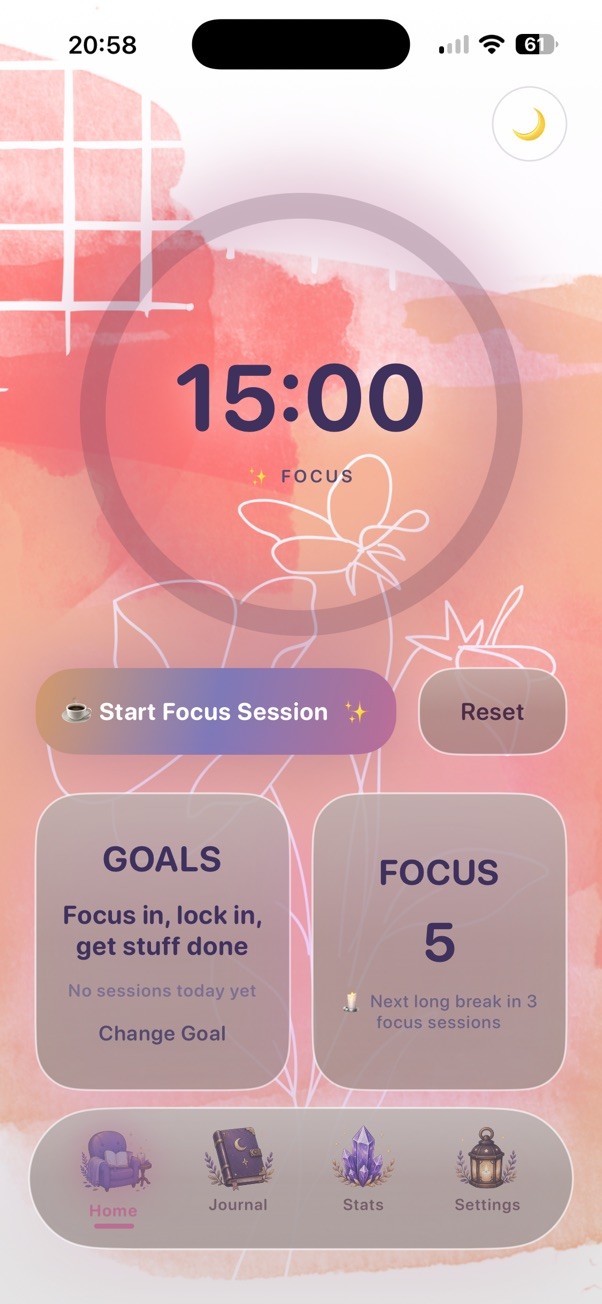
Cozy Pom early focus timer set to 15 minutes with coral and pink watercolor artwork
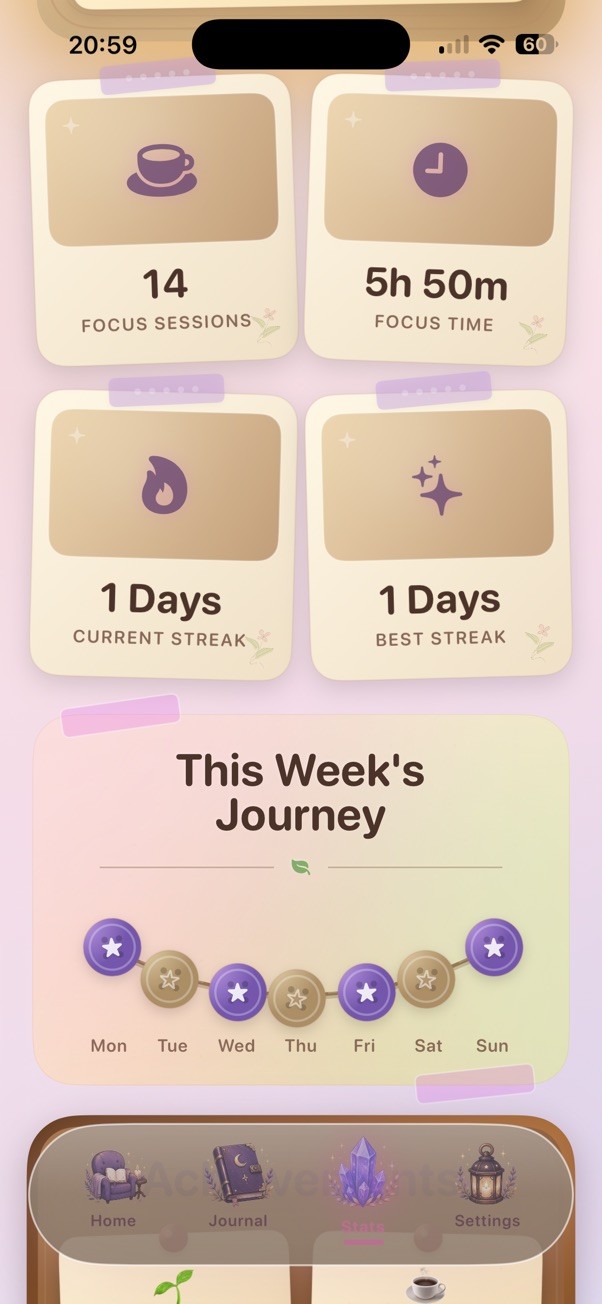
Cozy Pom early Stats screen with parchment-style cards on a pink and lavender background

Rough sketches, abandoned directions and concepts worth keeping.

MochiMoney

MochiMoney
MochiMoney early app sketch
MochiMoney early Calculator screen in the pink sakura theme
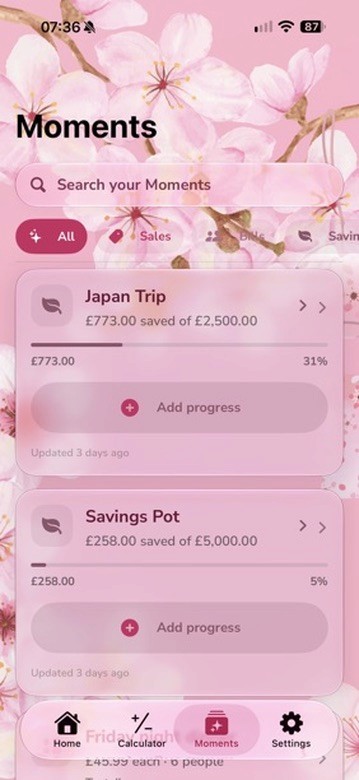
MochiMoney early Moments screen with savings goals in the pink sakura theme

Rough sketches, abandoned directions and concepts worth keeping.

Lumarii

Lumarii
Lumarii early app sketch
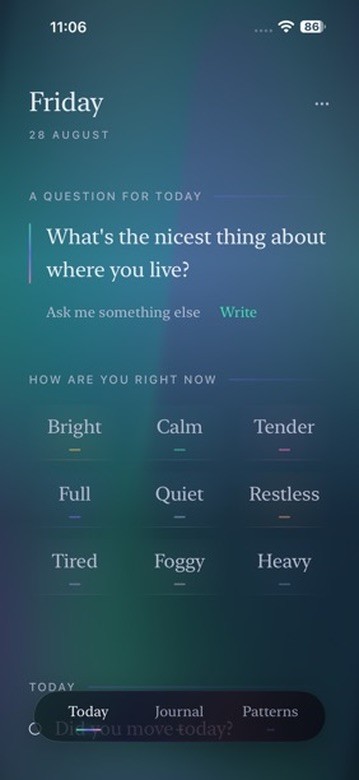
Lumarii early Today screen with a reflection prompt and mood choices
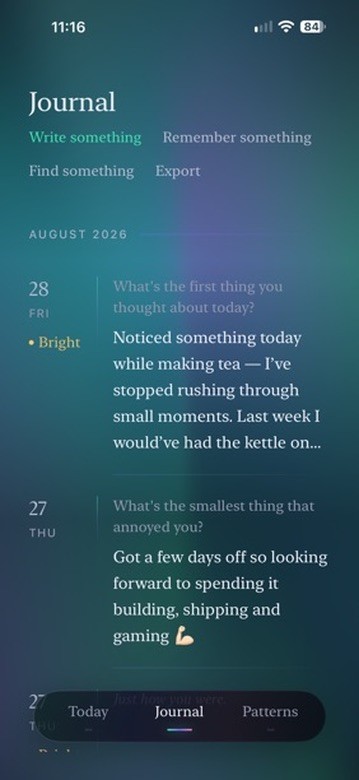
Lumarii early Journal screen with dated entries

Rough sketches, abandoned directions and concepts worth keeping.
Questory

Questory
Questory early home dashboard conceptQuestory early collection tracking concept
Questory early daily reward concept
Questory early blessing reward concept

Rough sketches, abandoned directions and concepts worth keeping.
Built in public, gently

No perfect process. Just thoughtful progress.

New notes will be added as the apps keep growing—one sketch, bug fix and cozy commit at a time.

TheCozyDev ☕

Independent iOS development, one cozy commit at a time.

© 2026 TheCozyDev